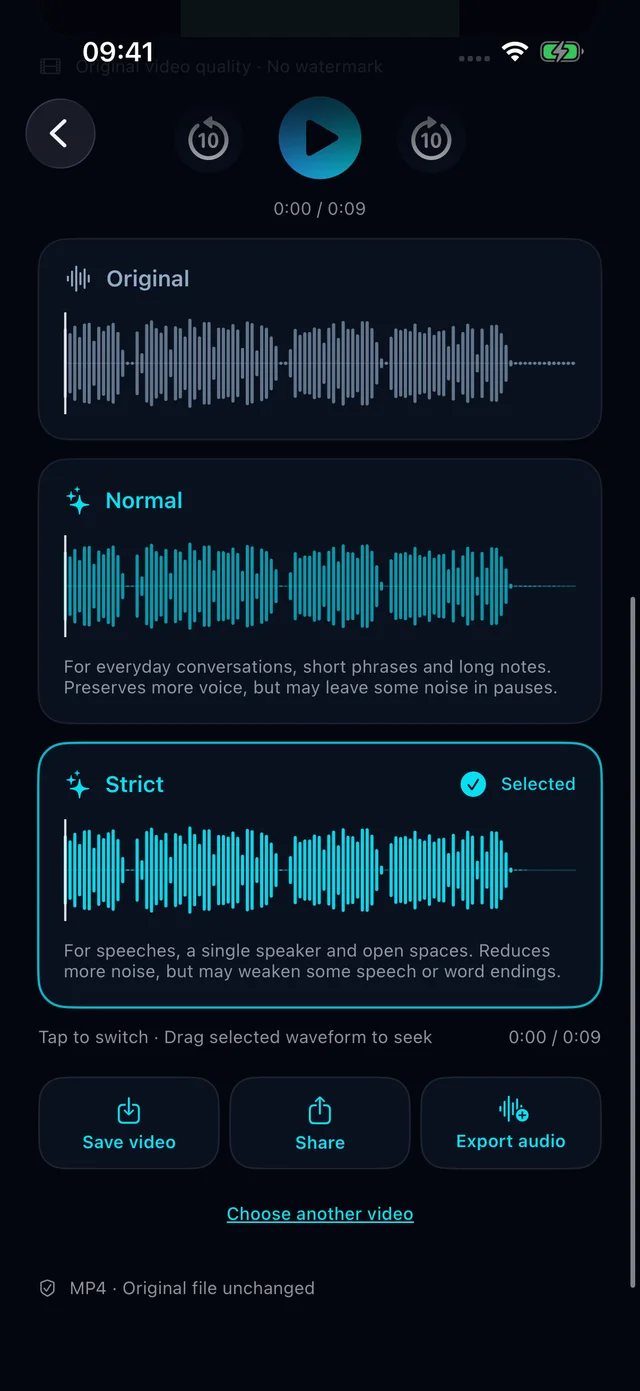
Normal
For everyday conversations, short phrases and long notes. Preserves more voice, but may leave some noise in pauses.
Compare with the original after processing HushVideo.View on the App Store
Less noise. More of what matters.
Clean up your video’s audio with HushVideo,
privately on your iPhone or iPad.
Remove background noise or voices from videos on iPhone and iPad. HushVideo processes audio on your device, with original comparison and MP4 export.
Clearer speech, or music in the spotlight?
Choose your goal. HushVideo takes it from there.
Keep speech and reduce background distractions. Make interviews, everyday moments and quick recordings easier to follow.
Remove speech and singing while keeping music and surroundings. Discover another side of the same video.
Compare with the original after processingFor everyday conversations, short phrases and long notes. Preserves more voice, but may leave some noise in pauses.
Compare with the original after processingFor speeches, a single speaker and open spaces. Reduces more noise, but may weaken some speech or word endings.
Compare with the original after processingAI audio processing happens on your iPhone or iPad.
No uploads. No registration.
Clean up the sound, and keep private moments private.
No complicated audio settings.
Import, choose, save. Simple.
Choose from Photos or Files, or start with the app’s built-in sample.
Choose Remove background or Remove voice and start processing. Tap a waveform to compare the result with the original.
Export a new MP4 to Photos or share it. Your original video stays intact.
Free: up to 10 minutes at 720p. All exports include a watermark.
View on the App StoreGet to know HushVideo before you begin.
No. Audio is processed on your iPhone or iPad with bundled AI models. No model download, account, ads or analytics. iCloud videos may first require a system download.
Remove background keeps speech, reduces distractions and centres the processed voice. Remove voice removes speech and singing while keeping music and surroundings. Compare either result with the original.
Requires iOS/iPadOS 18 or later. Import MP4/MOV, H.264/HEVC, mono or stereo, up to 4K. Free supports videos up to 10 minutes and exports up to 720p with a watermark. PRO has no video length limit and supports original-resolution export without watermarks. Export availability depends on the source file and available storage.
No. Saving or sharing creates a new MP4. Switch between the original and processed audio before exporting.
Results depend on the recording. Strong wind, clipping and faint speech can be difficult to recover. Remove background retains all speech, including background conversations and TV dialogue. Compare before saving and keep the app in the foreground while processing.
One purchase. Yours to keep.
With PRO, export the processed audio as an AAC-encoded M4A file with no video. Share it or save it to Files.
Video audio care, made for iPhone and iPad.
View on the App StoreRequires iOS / iPadOS 18 or later